Cookie Notice
This website uses cookies to enhance user experience and to analyze performance and traffic on our website. We also share information about your use of our site with our social media, advertising and analytics partners.
Great Erie FCU is now fully operational following our Digital Banking Upgrade.
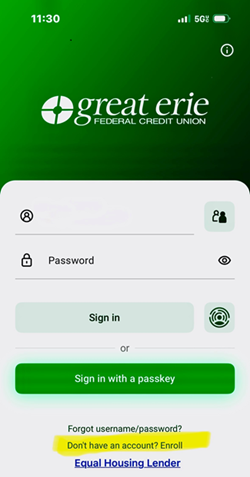
Starting May 4, you'll need to re-enroll in online banking at your convenience.
Step 1: Select the "Enroll in Digital Banking" button

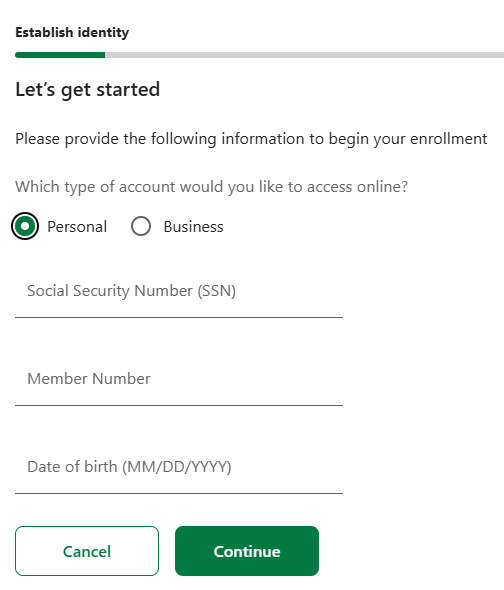
- Social Security Number (SSN)
- Member Number
- Date of Birth
This verification process is secure and designed to protect your personal and financial information.
Create Your New Username & Password
During re-enrollment, you will create a new username and password for your Digital Banking account. For your security, please do not use:
- Your Member Number
- Social Security Number
- Date of Birth
Choose credentials that are unique, secure, and easy for you to remember.
Mobile App Users
If you currently use our mobile banking app, you will need to download the new Great Erie FCU Digital Banking App and sign in using your newly created username and password after completing re-enrollment.
Need Assistance?
Member Service Support
Our Member Service Support team is here to help if you have any questions or need assistance. Please reach out to us using the contact details below:
📞 Member Service Support: 716.662.1311, Option 7
📧 Email: [email protected]
We are committed to providing you with the best possible service and support during this transition. If you have any questions or concerns, please do not hesitate to contact us. Thank you for your patience and support as we launch our new Digital Banking experience—designed with you in mind.
We Want to Hear From Our Members
Have feedback for us regarding our new core conversion and digital banking upgrade? We invite our credit union members to share their questions or feedback using the form below. Thank you for your membership.
Conversion & Platform Changes
FAQs Section
ONLINE BANKING: Can I use the same User Name and Password I currently use?
The first time you access the new system, you will need to click on the “Don’t have an account? Enroll” link. During the enrollment process, you can enter the same User Name and Password you use now, as long as they meet the following requirements:
Your username must not:
Contain your member number
Contain your social security number
Contain your birth date
Your password must not contain the following:
Your birth date
Your member number
Your social security number
Your password must contain the following:
Password must be at least 8-25 characters long At least one lowercase letter (a through z)
At least one uppercase letter (A through Z)
At least one number
At least one special character
Enter the member number for your primary account.
Use your member number when enrolling. For most members, this is a 4-5 digit number. For members who came from the IRS credit union, the number will start with 400, followed by the 4-digit number used at the IRS credit union.
Yes, if you are an authorized signer on the business account, you will see it when you sign in to your personal account.
ONLINE BANKING: Can I transfer to and from my business account?
When you are logged in to your personal account, you can transfer funds to and from your business account. However, if you register an online account for your business, you cannot transfer to and from your personal account to the business account.
ONLINE BANKING: I'm joint on a loan, why don't I see it when I log into my personal account?
Currently, only the primary person on the loan can see the loan when they sign in to their personal account, but this functionality will be added in the future.
BillPay was disabled on Thursday, April 23, but any payments scheduled prior to April 23rd will occur on time, with the exception of those scheduled for May 1st, 2nd or 3rd, which will occur but their posting will be delayed until May 4th.
The money will post to your account on May 4th.
TRANSFERS/BILLPAY/ACH: Will I have to re-enter/re-enroll my scheduled payments?
No, the BillPay scheduling history will be transferred over to the new online system.
TRANSFERS/BILLPAY/ACH: For Pay-a-Person, what is a daily transfer limit?
$500 per user—so no matter how many accounts you have, the daily limit is $500 per day.
TRANSFERS/BILLPAY/ACH: What is a daily limit for Bill Pay payment?
$10,000 per day.
TRANSFERS/BILLPAY/ACH: Can I schedule external transfer to pay for my loan at Great Erie FCU?
Yes, you can use ProPay or Plaid.
ZELLE: Where can I find Zelle in the new online banking system?
Zelle is no longer available in our online banking system. It is being replaced with the Pay-a-Person payment service. This product offers our members a way to send money to another person without requiring both individuals to enroll. You simply provide the other person's email address or cell phone number, then send them a secret word to accept the funds. Once the receiver clicks the link in their email or text, they enter the password you provided, then they will be asked to provide either their debit card information or their routing and account number where they want the money deposited. The Pay a Person service is located under Transfers and Payments.
Setting up a new direct deposit or updating an existing one can be done online through the new EasySwitch tool in the Transfers and Payments section. Simply search for your employer or payroll provider's name to start the process.
How far back can I research transactions on my share accounts?
After the initial launch of the new system, you will be able to view 1 year of transaction history.
Can I open new share accounts through the new online system?
Yes. If you have an existing account, navigate to the Message Center located under Tools & Services. Send us a secure message with details on the type of account you are interested in we will communicate with you through the message center. If necessary, we will send you any documents requiring an electronic signature. Please include details on where you would like funds pulled from to fund the account.
Where can I find my 1099-INT and 1098 tax statements?
Click on Accounts and select Year-End Information. Click on the appropriate share dividend link, and the details will appear on the right.
How do I do a Mobile Deposit with the new online system?
A mobile deposit can only be made through the App and is located at the bottom, where it says Deposit.
Can I put a stop payment on a check through the new system?
Yes. Simply navigate to the Make a Transfer link under the Transfers & Payments drop-down. You can also click on Stop Check when viewing your checking account.