Cookie Notice
This website uses cookies to enhance user experience and to analyze performance and traffic on our website. We also share information about your use of our site with our social media, advertising and analytics partners.
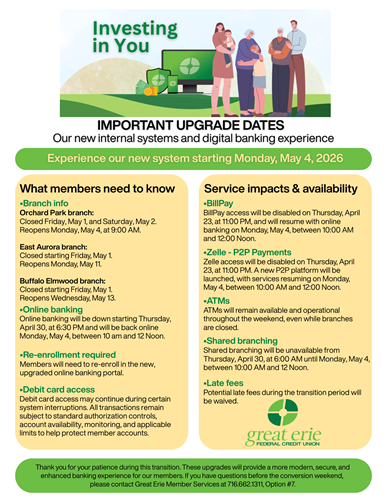
Exciting News! Our Online banking is getting a makeover. Do you have questions? We got the answers!
Why We're Upgrading
Built for the Way you Bank Today
Great Erie is upgrading both our core banking system and digital banking platform this spring.
This investment allows us to deliver:
- Enhanced security protections
- A refreshed online and mobile banking experience
- Improved performance and reliability
- New tools that position us for future innovation
We're committed to providing modern technology while maintaining the personal service you trust.
Enrollment & Platform Changes FAQs
FAQs Section
Why is the Online Banking platform changing?
We're always looking to improve your experience, so we're introducing amazing new features, a fresh look, and powerful tools designed to make your banking more accessible and enjoyable.
Do I need to update the app or download a new one?
Yes, you will need to download our new mobile banking app! Search the app store for: "Great Erie FCU Mobile Banking."
Yes, you'll need to re-enroll with a new username and password using your member number and some personal info. Don't worry—we've got detailed guides, helpful videos, and friendly staff ready to assist you every step of the way.
What can I do to prepare for this exciting change?
To prepare, make sure your contact information is up to date and keep your member number handy. You may request your member number at your local branch or view it by downloading your statement. These steps are essential for enrolling in the new platform and ensuring a smooth transition so you can enjoy all the new features!
How long do I have to re-enroll?
You can re-enroll at your convenience, but for the best experience, we recommend doing it within the first six months to start enjoying all the new features right away.
Do I need to re-enable my face authentication?
Yes, for security reasons, you will need to re-enable face authentication in your mobile app. You can easily set this up within the settings page of your mobile app.
Will there be downtime when switching to the new platform?
As part of this transition, some services will be temporarily unavailable. This is standard for financial institutions during a core system upgrade. We'll share exact timing and details well in advance so you can plan around it easily. Our goal is to keep this process as smooth and minimally disruptive as possible.
What happens if I have multiple users on my account?
Each user on your account will need to enroll separately. This includes joint account holders, co-signers, and any other authorized users. By registering individually, everyone can enjoy personalized access and all the great features the new platform offers!
Questions About the Update?
Member Service Support
Our Member Service Support team is here to help if you have any questions or need assistance. Please reach out to us using the contact details below:
📞 Member Service Support: 716.662.1311, Option 7
📧 Email: [email protected]
We are committed to providing you with the best possible service and support during this transition. If you have any questions or concerns, please do not hesitate to contact us.